Opencare Font for Modern Web Design
As a web designer, choosing the right typeface can make or break a digital experience. Opencare stands out as a modern handwritten script font that brings a natural, flowing elegance to any design. Its clean, monoline strokes and slightly slanted letterforms create a balance between casual charm and refined professionalism.
Visual Characteristics of Opencare
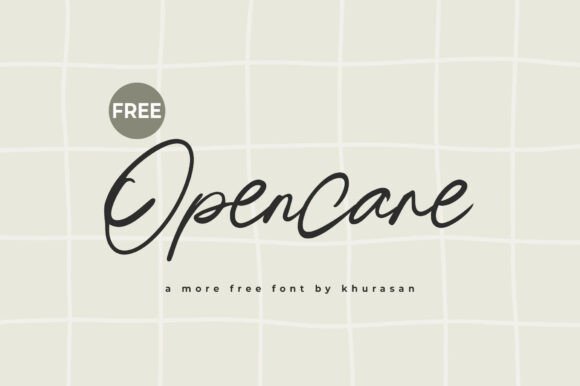
Opencare mimics real penmanship with its elegant, flowing style. The font has a soft, organic feel that works well for creative projects where personality matters. It’s not overly ornate, making it suitable for both decorative accents and readable content when used appropriately.
The slightly slanted letterforms give it a dynamic energy, while the consistent stroke width ensures clarity across different screen sizes. This makes Opencare ideal for headers, call-to-action buttons, and other visual elements that need to stand out without overwhelming the user.
Using Opencare in Website Layouts
For website headers and hero sections, Opencare adds a touch of sophistication. It works particularly well on landing pages that aim to convey creativity, such as those for creative portfolios, coaching websites, or boutique online stores. Pairing Opencare with a clean sans serif font for body copy helps maintain readability without sacrificing visual interest.
In online shop banners or product landing pages, Opencare can be used for short, impactful phrases or brand taglines. It creates a friendly yet professional tone that resonates with customers looking for quality and authenticity.
On blog headers or course sales pages, Opencare enhances the editorial feel of the content. It’s especially effective for headings and subheadings that need to draw attention while maintaining a sense of approachability.
Readability and Visual Hierarchy
While Opencare is a script font, it's designed with digital readability in mind. Its clean lines and moderate slant ensure that it remains legible even at smaller sizes. When used for section headings or call-to-action areas, it helps guide the user’s eye through the layout effectively.
For mobile screens and responsive layouts, it’s important to test Opencare at various sizes. In most cases, it performs well on smaller devices, but designers should always consider spacing and contrast when using it for small buttons or text overlays.
When paired with a contrasting background—whether light or dark—Opencare maintains its visual appeal. For image overlays or dark mode interfaces, ensuring sufficient contrast will help preserve readability and maintain a polished look.
Brand Tone and User Engagement
The personality of Opencare aligns well with brands that want to communicate creativity, trust, and approachability. It’s a great choice for websites that aim to build a strong emotional connection with their audience, such as personal branding sites, lifestyle blogs, or creative agencies.
By incorporating Opencare into your brand identity, you can create a cohesive visual language that reinforces your message. Whether it’s for logo text, decorative accents, or supporting typography, this font contributes to a consistent and memorable online presence.
Font Pairing and Stylistic Considerations
Opencare pairs beautifully with simple sans serif fonts like Helvetica or Arial for body copy, allowing the script font to remain the focal point. For more editorial designs, pairing it with a serif font can add depth and maturity to the overall look.
When designing a digital brand kit or template, consider how Opencare interacts with other design elements. It works best when used sparingly, as overuse can lead to visual clutter. Use it for headings, logos, and key phrases to maintain balance and focus.
Practical Tips for Using Opencare
Before implementing Opencare on a live site, check the available styles, file formats, and webfont compatibility. Ensure that it supports the languages and characters required for your project. If you plan to use it for commercial purposes, verify the licensing terms to avoid any legal issues.
For digital products, landing pages, or online stores, always consider how the font affects user engagement. Test different placements and pairings to find what works best for your specific audience and goals.
Opencare is a versatile, modern typeface that offers both style and functionality. Whether you're building a creative portfolio, launching a new product, or enhancing an existing website, this free font provides a valuable tool for achieving a unique and professional look.